使用 HTML + JavaScript 实现多会议室甘特视图管理系统(附完整代码)
|
admin 2025年12月27日 15:48
本文热度 702
2025年12月27日 15:48
本文热度 702
|
在现代企业办公环境中,会议室资源的有效管理是提升工作效率的重要环节。本文将详细介绍一个基于 HTML、CSS 和 JavaScript 实现的多会议室甘特视图管理系统,帮助用户直观地查看和管理会议室预订情况。效果演示
git地址:https://gitee.com/ironpro/hjdemo/blob/master/meeting-gantt/index.html
该系统通过甘特图形式展示多个会议室在一天内的使用情况,用户可以选择不同日期查看会议室预订状态,并能申请新的会议。系统提供了清晰的时间轴和颜色编码来区分不同状态的会议。用户可以方便地查看会议室占用情况,并通过简单的界面提交新的会议室预订申请。 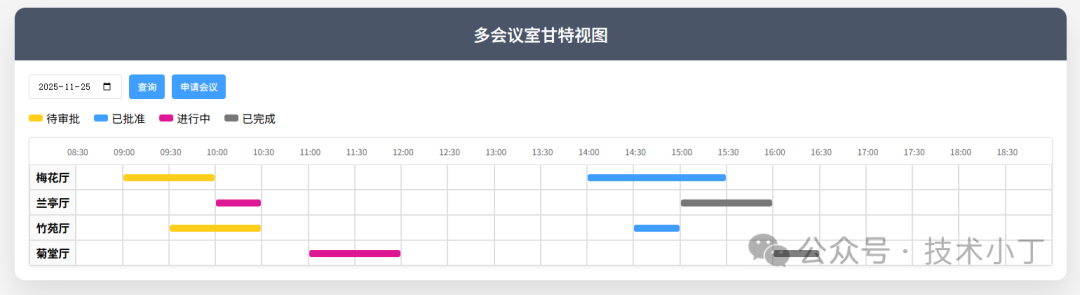 页面结构控制面板区域
控制面板位于页面顶部,提供日期选择和基本操作按钮。这个区域允许用户选择查看的日期,并提供了申请会议的按钮。 <div class="controls"> <input type="date" id="dateInp"> <button onclick="search()">查询</button> <button onclick="openApplyModal()">申请会议</button></div>
图例说明区域
为了让用户更好理解不同颜色代表的含义,系统提供了图例说明。 <div class="legend"> <div class="legend-item"> <div class="legend-color yellow"></div> <span>待审批</span> </div> </div>
甘特图展示区域
这是系统的核心展示区域,以表格形式呈现各会议室在不同时段的使用情况。 <div class="gantt-container"> <div id="gantt" class="gantt"></div></div>
弹窗区域
系统包含两个主要弹窗:会议申请弹窗和会议详情弹窗,分别用于创建新会议和查看详情。 <div id="applyModal" class="modal">...</div><div id="meetingModal" class="modal">...</div>
核心功能实现数据模型设计
系统首先定义了基础数据结构,包括会议室列表、时间片数组和状态映射。 var rooms = ['梅花厅','兰亭厅','竹苑厅','菊堂厅'];var timeArr = ['08:30','09:00','09:30','10:00','10:30','11:00','11:30','12:00','12:30','13:00','13:30','14:00','14:30','15:00','15:30','16:00','16:30','17:00','17:30','18:00','18:30'];var statusMap = { 1: '待审批', 3: '已批准', 4: '进行中', 5: '已完成'};
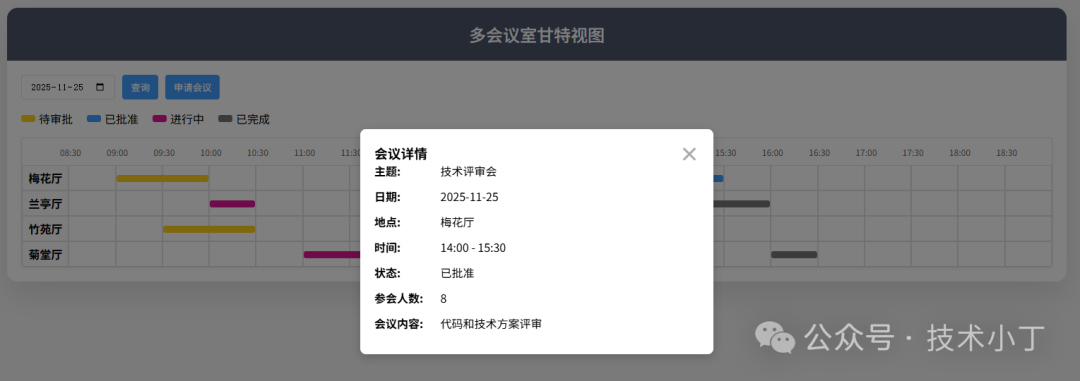
甘特图渲染机制甘特图渲染是系统最核心的功能,通过 renderGantt 函数实现: 首先创建时间标题行,显示各个时间点 然后为每个会议室创建一行,显示该会议室在各个时间段的状态 最后为每个会议条目绑定点击事件,用于显示详细信息
function renderGantt(meetingsData) { var box = document.getElementById('gantt'); box.innerHTML = '';
var hRow = document.createElement('div'); hRow.className = 'row'; hRow.innerHTML = '<div class="cell-time"></div>' + timeArr.map(t => `<div class="cell-time">${t}</div>`).join(''); box.appendChild(hRow);
rooms.forEach(room => { var row = document.createElement('div'); row.className = 'row';
var html = `<div class="cell room">${room}</div>`; var roomMeetings = meetingsData.filter(m => m.room === room)[0]?.map || {};
timeArr.forEach(time => { if (roomMeetings[time]) { var [len, color, meeting] = roomMeetings[time]; html += `<div class="cell"> <div class="meeting ${color}" style="width:calc(${len*100}% + ${(len-1)*2}px)" data-meeting='${JSON.stringify(meeting)}'> </div> </div>`; } else { html += '<div class="cell"></div>'; } });
row.innerHTML = html; box.appendChild(row); });
document.querySelectorAll('.meeting').forEach(el => { el.addEventListener('click', () => { var meetingData = JSON.parse(el.getAttribute('data-meeting')); showMeetingDetail(meetingData); }); });}
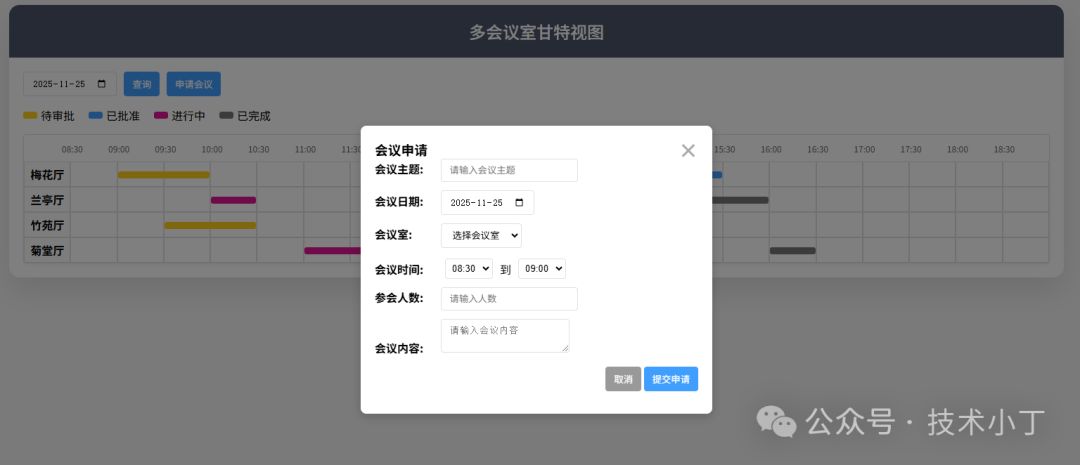
会议申请与冲突检测系统支持用户提交新的申请,并具备冲突检测功能: 用户填写会议信息,包括主题、日期、会议室、时间等 系统检查所选时间段是否与现有会议冲突 如果没有冲突,则将新会议添加到用户会议列表中
function submitMeeting() { var conflictingMeetings = getMeetingsByDate(date).filter(m => m.room === room && m.date === date && isTimeOverlap(startTime, duration, m.start, m.time) );
if (conflictingMeetings.length > 0) { alert('该时间段已有会议,请选择其他时间'); return; }
userMeetings.push({ room, date, start: startTime, time: duration, status: 1, isCreator: 'true', title, content, attendeeCount: parseInt(attendeeCount) });
alert('会议申请已提交'); closeApplyModal();
['modalMeetingTitle', 'modalMeetingContent', 'modalAttendeeCount'].forEach(id => { document.getElementById(id).value = ''; });
search();}
时间选择联动为了提高用户体验,系统的会议时间选择具有联动效果。当用户选择开始时间后,结束时间选项会自动更新,只显示晚于开始时间的选项。function updateEndTimeOptions() { var startTimeSelect = document.getElementById('startTimeSelect'); var endTimeSelect = document.getElementById('endTimeSelect'); var selectedStartTime = startTimeSelect.value;
endTimeSelect.innerHTML = '';
var startIndex = timeArr.indexOf(selectedStartTime); for (var i = startIndex + 1; i < timeArr.length; i++) { var option = document.createElement('option'); option.value = timeArr[i]; option.textContent = timeArr[i]; endTimeSelect.appendChild(option); }}
扩展建议权限管理系统:增加用户角色管理,区分普通用户、管理员等不同权限,允许管理员审批会议申请。 导入导出功能:支持将会议室预订情况导出为Excel或PDF格式,便于统计和汇报。 会议室资源配置:为每个会议室添加容量、设备等详细信息,帮助用户选择合适的会议室。 重复会议功能:支持创建周期性会议,如每周例会等。 人员选择功能:支持直接选择参会人员,方便每个人参看自己要参与的会议。
完整代码git地址:https://gitee.com/ironpro/hjdemo/blob/master/meeting-gantt/index.html<!DOCTYPE html><html lang="zh-CN"><head> <meta charset="UTF-8"> <title>多会议室甘特视图</title> <style> * { margin: 0; padding: 0; box-sizing: border-box; } body { background-color: #f5f5f5; min-height: 100vh; padding: 20px; } .container { max-width: 1500px; margin: 0 auto; background: white; border-radius: 15px; box-shadow: 0 20px 40px rgba(0,0,0,0.1); overflow: hidden; } .header { background: #4a5568; color: white; padding: 20px; text-align: center; }
.header h1 { font-size: 24px; font-weight: 500; } .main { padding: 20px; } .controls { display: flex; gap: 10px; margin-bottom: 10px; flex-wrap: wrap; }
select, button, input, textarea { padding: 8px 14px; border: 1px solid #e0e0e0; border-radius: 4px; }
button { background: #409EFF; color: white; border: none; cursor: pointer; transition: background 0.3s; }
button:hover { opacity: 0.9; }
.gantt-container { background: white; border: 1px solid #e0e0e0; border-radius: 4px; overflow: hidden; box-shadow: 0 2px 5px rgba(0,0,0,0.05); }
.gantt { width: 100%; display: table; table-layout: fixed; }
.row { display: table-row; }
.cell { display: table-cell; border: 1px solid #e0e0e0; text-align: center; vertical-align: middle; height: 36px; width: 4.2%; position: relative; }
.cell.room { width: 11.8%; font-weight: bold; background: #fafafa; }
.cell-time { width: 4.2%; height: 38px; font-size: 14px; color: #666; display: table-cell; text-align: center; vertical-align: middle; position: relative; left: -2.1%; }
.cell-time:first-child { left: 0; }
.meeting { height: 10px; border-radius: 3px; position: absolute; left: 0; top: 13px; z-index: 999; cursor: pointer; }
.yellow { background: #FFCE1A; } .blue { background: #409EFF; } .pink { background: #DE1794; } .gray { background: #777; }
.pagination { text-align: right; margin-top: 10px; }
.legend { margin: 15px 0; display: flex; align-items: center; gap: 20px; flex-wrap: wrap; }
.legend-item { display: flex; align-items: center; gap: 5px; }
.legend-color { width: 20px; height: 10px; border-radius: 3px; }
.apply-form { margin: 20px 0; padding: 15px; border: 1px solid #e0e0e0; background: #fff; border-radius: 4px; }
.apply-form input, .apply-form textarea, .apply-form select { margin-right: 10px; margin-bottom: 10px; }
.modal { display: none; position: fixed; z-index: 1000; left: 0; top: 0; width: 100%; height: 100%; background-color: rgba(0,0,0,0.5); }
.modal-content { background-color: #fff; margin: 10% auto; padding: 20px; border: none; width: 90%; max-width: 500px; border-radius: 8px; box-shadow: 0 4px 15px rgba(0,0,0,0.2); }
.close { color: #aaa; float: right; font-size: 28px; font-weight: bold; cursor: pointer; line-height: 1; }
.close:hover { color: #000; }
.meeting-detail div { margin-bottom: 14px; }
.meeting-detail label { font-weight: bold; margin-right: 10px; display: inline-block; width: 80px; }
.time-selection { display: flex; align-items: center; gap: 10px; margin: 15px 0; }
.time-selection select { padding: 5px; } </style></head><body><div class="container"> <div class="header"> <h1>多会议室甘特视图</h1> </div>
<div class="main"> <div class="controls"> <input type="date" id="dateInp"> <button onclick="search()">查询</button> <button onclick="openApplyModal()">申请会议</button> </div>
<div class="legend"> <div class="legend-item"> <div class="legend-color yellow"></div> <span>待审批</span> </div> <div class="legend-item"> <div class="legend-color blue"></div> <span>已批准</span> </div> <div class="legend-item"> <div class="legend-color pink"></div> <span>进行中</span> </div> <div class="legend-item"> <div class="legend-color gray"></div> <span>已完成</span> </div> </div>
<div class="gantt-container"> <div id="gantt" class="gantt"></div> </div> </div></div>
<div id="applyModal" class="modal"> <div class="modal-content"> <span class="close" onclick="closeApplyModal()">×</span> <h3>会议申请</h3> <div class="meeting-detail"> <div> <label>会议主题:</label> <input type="text" id="modalMeetingTitle" placeholder="请输入会议主题"> </div> <div> <label>会议日期:</label> <input type="date" id="modalApplyDate"> </div> <div> <label>会议室:</label> <select id="modalApplyRoom"> <option value="">选择会议室</option> </select> </div> <div class="time-selection"> <label>会议时间:</label> <select id="startTimeSelect"></select> <span>到</span> <select id="endTimeSelect"></select> </div> <div> <label>参会人数:</label> <input type="number" id="modalAttendeeCount" min="1" placeholder="请输入人数"> </div> <div> <label>会议内容:</label> <textarea id="modalMeetingContent" placeholder="请输入会议内容"></textarea> </div> <div style="text-align: right; margin-top: 15px;"> <button onclick="closeApplyModal()" style="background:#999">取消</button> <button onclick="submitMeeting()">提交申请</button> </div> </div> </div></div>
<div id="meetingModal" class="modal"> <div class="modal-content"> <span class="close" onclick="closeMeetingModal()">×</span> <h3>会议详情</h3> <div class="meeting-detail" id="meetingDetailContent"></div> </div></div>
<script> var rooms = ['梅花厅','兰亭厅','竹苑厅','菊堂厅']; var timeArr = ['08:30','09:00','09:30','10:00','10:30','11:00','11:30','12:00','12:30','13:00','13:30','14:00','14:30','15:00','15:30','16:00','16:30','17:00','17:30','18:00','18:30']; var statusMap = { 1: '待审批', 3: '已批准', 4: '进行中', 5: '已完成' };
var mockDataByDate = { '2025-11-25': { '梅花厅': [ {start: '09:00', time: 2, status: 1, title: '项目启动会', content: '讨论新项目启动相关事宜', attendeeCount: 15}, {start: '14:00', time: 3, status: 3, title: '技术评审会', content: '代码和技术方案评审', attendeeCount: 8} ], '兰亭厅': [ {start: '10:00', time: 1, status: 4, title: '客户洽谈会', content: '重要客户合作洽谈', attendeeCount: 5}, {start: '15:00', time: 2, status: 5, title: '培训会', content: '新员工技能培训', attendeeCount: 20} ], '竹苑厅': [ {start: '09:30', time: 2, status: 1, title: '部门例会', content: '部门日常工作安排', attendeeCount: 5}, {start: '14:30', time: 1, status: 3, title: '预算审批会', content: '部门预算审批讨论', attendeeCount: 6} ], '菊堂厅': [ {start: '11:00', time: 2, status: 4, title: '合作伙伴会', content: '合作伙伴关系维护', attendeeCount: 10}, {start: '16:00', time: 1, status: 5, title: '安全培训会', content: '安全知识培训', attendeeCount: 25} ] }, };
var userMeetings = [];
var dayjs = (d) => { var date = new Date(d); return { format(fmt) { return fmt.replace('YYYY', date.getFullYear()) .replace('MM', String(date.getMonth() + 1).padStart(2, '0')) .replace('DD', String(date.getDate()).padStart(2, '0')); } }; };
var isTimeOverlap = (start1, duration1, start2, duration2) => { var startIndex1 = timeArr.indexOf(start1); var endIndex1 = startIndex1 + duration1; var startIndex2 = timeArr.indexOf(start2); var endIndex2 = startIndex2 + duration2; return (startIndex1 < endIndex2) && (startIndex2 < endIndex1); };
var getMeetingsByDate = (date) => { var meetings = [];
rooms.forEach(room => { var dateData = mockDataByDate[date] || {}; var roomMeetings = dateData[room] || [];
roomMeetings.forEach(meeting => { meetings.push({ room, date, start: meeting.start, time: meeting.time, status: meeting.status, isCreator: Math.random() > 0.5 ? 'true' : 'false', title: meeting.title, content: meeting.content, attendeeCount: meeting.attendeeCount }); }); });
meetings.push(...userMeetings.filter(m => m.date === date)); return meetings; };
function renderGantt(meetingsData) { var box = document.getElementById('gantt'); box.innerHTML = '';
var hRow = document.createElement('div'); hRow.className = 'row'; hRow.innerHTML = '<div class="cell-time"></div>' + timeArr.map(t => `<div class="cell-time">${t}</div>`).join(''); box.appendChild(hRow);
rooms.forEach(room => { var row = document.createElement('div'); row.className = 'row';
var html = `<div class="cell room">${room}</div>`; var roomMeetings = meetingsData.filter(m => m.room === room)[0]?.map || {};
timeArr.forEach(time => { if (roomMeetings[time]) { var [len, color, meeting] = roomMeetings[time]; html += `<div class="cell"> <div class="meeting ${color}" style="width:calc(${len*100}% + ${(len-1)*2}px)" data-meeting='${JSON.stringify(meeting)}'> </div> </div>`; } else { html += '<div class="cell"></div>'; } });
row.innerHTML = html; box.appendChild(row); });
document.querySelectorAll('.meeting').forEach(el => { el.addEventListener('click', () => { var meetingData = JSON.parse(el.getAttribute('data-meeting')); showMeetingDetail(meetingData); }); }); }
function search() { var date = document.getElementById('dateInp').value; if (!date) date = dayjs(new Date()).format('YYYY-MM-DD'); else date = dayjs(date).format('YYYY-MM-DD');
var list = getMeetingsByDate(date);
var groupedData = rooms.map(room => ({ room, name: room, map: {} }));
list.forEach(meeting => { var color = {1:'yellow', 3:'blue', 4:'pink', 5:'gray'}[meeting.status]; var roomData = groupedData.find(r => r.room === meeting.room); if (roomData) { roomData.map[meeting.start] = [meeting.time, color, meeting]; } });
renderGantt(groupedData); }
function openApplyModal() { var modal = document.getElementById('applyModal'); document.getElementById('modalApplyDate').value = dayjs(new Date()).format('YYYY-MM-DD');
var roomSelect = document.getElementById('modalApplyRoom'); roomSelect.innerHTML = '<option value="">选择会议室</option>'; rooms.forEach(room => { var option = document.createElement('option'); option.value = room; option.textContent = room; roomSelect.appendChild(option); });
initTimeSelectors(); modal.style.display = 'block'; }
function closeApplyModal() { document.getElementById('applyModal').style.display = 'none'; }
function initTimeSelectors() { var startTimeSelect = document.getElementById('startTimeSelect'); var endTimeSelect = document.getElementById('endTimeSelect');
startTimeSelect.innerHTML = ''; endTimeSelect.innerHTML = '';
timeArr.slice(0, -1).forEach(time => { var option = document.createElement('option'); option.value = time; option.textContent = time; startTimeSelect.appendChild(option); });
timeArr.slice(1).forEach(time => { var option = document.createElement('option'); option.value = time; option.textContent = time; endTimeSelect.appendChild(option); });
startTimeSelect.selectedIndex = 0; endTimeSelect.selectedIndex = 0;
startTimeSelect.onchange = updateEndTimeOptions; }
function updateEndTimeOptions() { var startTimeSelect = document.getElementById('startTimeSelect'); var endTimeSelect = document.getElementById('endTimeSelect'); var selectedStartTime = startTimeSelect.value; var currentEndTime = endTimeSelect.value;
endTimeSelect.innerHTML = '';
var startIndex = timeArr.indexOf(selectedStartTime); for (var i = startIndex + 1; i < timeArr.length; i++) { var option = document.createElement('option'); option.value = timeArr[i]; option.textContent = timeArr[i]; endTimeSelect.appendChild(option); }
if (timeArr.indexOf(currentEndTime) > startIndex) { endTimeSelect.value = currentEndTime; } else { endTimeSelect.selectedIndex = 0; } }
function submitMeeting() { var title = document.getElementById('modalMeetingTitle').value; var content = document.getElementById('modalMeetingContent').value; var date = document.getElementById('modalApplyDate').value; var room = document.getElementById('modalApplyRoom').value; var attendeeCount = document.getElementById('modalAttendeeCount').value; var startTime = document.getElementById('startTimeSelect').value; var endTime = document.getElementById('endTimeSelect').value;
if (!title || !date || !room || !attendeeCount || !startTime || !endTime) { alert('请填写完整信息'); return; }
var startIndex = timeArr.indexOf(startTime); var endIndex = timeArr.indexOf(endTime);
if (startIndex >= endIndex) { alert('结束时间必须晚于开始时间'); return; }
var duration = endIndex - startIndex; var conflictingMeetings = getMeetingsByDate(date).filter(m => m.room === room && m.date === date && isTimeOverlap(startTime, duration, m.start, m.time) );
if (conflictingMeetings.length > 0) { alert('该时间段已有会议,请选择其他时间'); return; }
userMeetings.push({ room, date, start: startTime, time: duration, status: 1, isCreator: 'true', title, content, attendeeCount: parseInt(attendeeCount) });
alert('会议申请已提交'); closeApplyModal();
['modalMeetingTitle', 'modalMeetingContent', 'modalAttendeeCount'].forEach(id => { document.getElementById(id).value = ''; });
search(); }
function showMeetingDetail(meeting) { var modal = document.getElementById('meetingModal'); var detailContent = document.getElementById('meetingDetailContent');
var startTimeIndex = timeArr.indexOf(meeting.start); var endTimeIndex = startTimeIndex + meeting.time; var endTime = endTimeIndex < timeArr.length ? timeArr[endTimeIndex] : '结束'; var statusText = statusMap[meeting.status] || '未知';
detailContent.innerHTML = ` <div><label>主题:</label> ${meeting.title}</div> <div><label>日期:</label> ${meeting.date}</div> <div><label>地点:</label> ${meeting.room}</div> <div><label>时间:</label> ${meeting.start} - ${endTime}</div> <div><label>状态:</label> ${statusText}</div> <div><label>参会人数:</label> ${meeting.attendeeCount || 'N/A'}</div> <div><label>会议内容:</label> ${meeting.content || '无'}</div> `;
modal.style.display = 'block'; }
function closeMeetingModal() { document.getElementById('meetingModal').style.display = 'none'; }
window.onload = function() { document.getElementById('dateInp').value = dayjs(new Date()).format('YYYY-MM-DD'); search();
window.onclick = function(event) { var applyModal = document.getElementById('applyModal'); var meetingModal = document.getElementById('meetingModal');
if (event.target === applyModal) closeApplyModal(); if (event.target === meetingModal) closeMeetingModal(); }; };</script>
</body></html>
阅读原文:https://mp.weixin.qq.com/s/BkXBGjGRh9Yk_pOMAp6KEw
该文章在 2025/12/27 15:50:34 编辑过
|
|






 400 186 1886