"bubble">
${html}</div>`;
chatArea.appendChild(div); if (scroll) chatArea.scrollTop = chatArea.scrollHeight;}@ 模式检测与列表显示
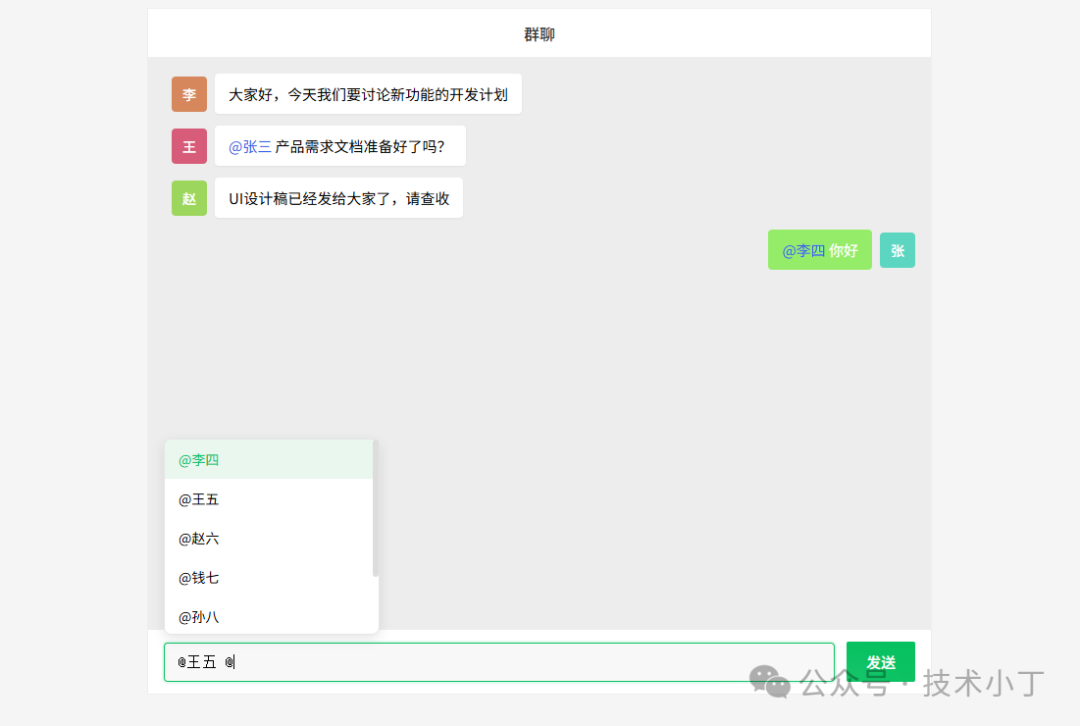
当用户在输入框中输入 @ 符号时,需要检测当前是否进入 @ 模式,并显示对应的用户列表。通过获取光标位置和文本内容来判断是否需要显示提示列表。function handleAtMode() { const val = input.value, cur = input.selectionStart; const last = val.lastIndexOf('@', cur - 1); if (last === -1 || val.substring(last + 1, cur).includes(' ')) { hideAt(); return; } atQuery = val.substring(last + 1, cur); showAt();}
成员筛选与键盘操作
实现键盘事件处理,支持方向键导航选择用户,回车确认选择,以及 ESC 键取消提示列表。input.addEventListener('keydown', e => { if (e.key === 'Enter' && !e.shiftKey) { if (atMode) { e.preventDefault(); const users = filterUsers(); if (atSel >= 0 && users.length > 0) pickAt(users[atSel].name); return; } e.preventDefault(); send(); } else if (atMode && ['ArrowDown', 'ArrowUp', 'Escape'].includes(e.key)) { e.preventDefault(); const users = filterUsers(); if (users.length === 0) return; if (e.key === 'ArrowDown') atSel = (atSel + 1) % users.length; else if (e.key === 'ArrowUp') atSel = (atSel - 1 + users.length) % users.length; else if (e.key === 'Escape') return hideAt(); renderAt(); }});
成员选择与文本插入
当用户通过点击或键盘选择某个用户时,需要将该用户名插入到输入框的正确位置,并更新光标位置。function pickAt(name) { const val = input.value; const cur = input.selectionStart; let lastAt = -1; for (let i = cur - 1; i >= 0; i--) { if (val[i] === '@') { lastAt = i; break; } else if (val[i] === ' ') { break; } } if (lastAt === -1) return; const before = val.substring(0, lastAt); const after = val.substring(cur); input.value = before + '@' + name + ' ' + after; const newCursorPos = lastAt + name.length + 2; input.setSelectionRange(newCursorPos, newCursorPos); input.focus(); hideAt(); autoHeight();}
完整代码
<!DOCTYPE html><html lang="zh-CN"><head> <meta charset="utf-8" /> <meta name="viewport" content="width=device-width, initial-scale=1.0" /> <title>群聊@功能</title> <style> * { margin: 0; padding: 0; box-sizing: border-box; } body { height: 100vh; padding: 20px; display: flex; justify-content: center; background-color: #f5f5f5; } .container { width: 800px; height: 700px; display: flex; flex-direction: column; background: #fff; overflow: hidden; border: 1px solid #eee; } .header { height: 50px; background: #fff; color: #333; display: flex; align-items: center; justify-content: center; font-size: 16px; font-weight: 500; border-bottom: 1px solid #eee; box-shadow: 0 1px 2px rgba(0, 0, 0, 0.03); } .chat-area { flex: 1; overflow-y: auto; padding: 16px; background: #EDEDED; } .chat-area::-webkit-scrollbar { width: 6px; } .chat-area::-webkit-scrollbar-track { background: transparent; } .chat-area::-webkit-scrollbar-thumb { background: #ddd; border-radius: 3px; } .chat-area::-webkit-scrollbar-thumb:hover { background: #bbb; } .msg { display: flex; align-items: center; margin-bottom: 14px; } .msg.me { justify-content: flex-end; } .avatar { width: 36px; height: 36px; border-radius: 4px; display: flex; align-items: center; justify-content: center; color: #fff; font-size: 14px; margin: 0 8px; flex-shrink: 0; font-weight: 500; } .msg.me .avatar { order: 2; margin-left: 8px; margin-right: 0; } .bubble { max-width: 75%; padding: 10px 14px; border-radius: 4px; font-size: 15px; line-height: 1.4; word-break: break-word; } .msg.me .bubble { background: #95EC69; color: #fff; border-bottom-right-radius: 4px; } .msg.other .bubble { background: #fff; border-bottom-left-radius: 4px; box-shadow: 0 1px 2px rgba(0, 0, 0, 0.05); } .at { color: #3462E3; } .footer { background: #fff; padding: 14px 16px; display: flex; align-items: center; border-top: 1px solid #eee; } .input-box { flex: 1; position: relative; } #input { width: 100%; min-height: 40px; max-height: 120px; padding: 10px 14px; border: 1px solid #e5e5e5; border-radius: 4px; font-size: 15px; resize: none; overflow-y: auto; background: #f8f8f8; display: block; box-sizing: border-box; transition: border-color 0.2s; } #input:focus { outline: none; border-color: #07c160; box-shadow: 0 0 0 2px rgba(7, 193, 96, 0.1); } #sendBtn { margin-left: 14px; padding: 10px 20px; background: #07c160; color: #fff; border: none; border-radius: 2px; font-size: 15px; cursor: pointer; transition: all 0.2s; font-weight: 500; } #sendBtn:hover:not(:disabled) { background: #06a050; } #sendBtn:disabled { background: #ccc; cursor: not-allowed; } .at-list { position: absolute; bottom: calc(100% + 8px); left: 0; width: 220px; max-height: 200px; overflow-y: auto; background: #fff; border: 1px solid #e5e5e5; border-radius: 8px; display: none; z-index: 100; box-shadow: 0 4px 14px rgba(0, 0, 0, 0.1); } .at-list::-webkit-scrollbar { width: 6px; } .at-list::-webkit-scrollbar-track { background: transparent; } .at-list::-webkit-scrollbar-thumb { background: #ddd; border-radius: 3px; } .at-list::-webkit-scrollbar-thumb:hover { background: #bbb; } .at-item { padding: 10px 14px; font-size: 14px; cursor: pointer; transition: background-color 0.2s; } .at-item:hover { background: #f5f5f5; } .at-item.on { background: #e9f7ef; color: #07c160; } </style></head><body><div class="container"> <div class="header">群聊</div> <div class="chat-area" id="chatArea"></div> <div class="footer"> <div class="input-box"> <textarea id="input" placeholder="输入消息..." rows="1"></textarea> <div class="at-list" id="atList"></div> </div> <button id="sendBtn">发送</button> </div></div>
<script> const chatArea = document.getElementById('chatArea'); const input = document.getElementById('input'); const atList = document.getElementById('atList'); const sendBtn = document.getElementById('sendBtn'); const members = [ {name: '张三', wx: 'zs001'}, {name: '李四', wx: 'ls002'}, {name: '王五', wx: 'ww003'}, {name: '赵六', wx: 'zl004'}, {name: '钱七', wx: 'qq005'}, {name: '孙八', wx: 'sb006'}, {name: '周九', wx: 'zj007'}, {name: '吴十', wx: 'ws008'} ]; const me = '张三'; let msgs = [ {who: '李四', txt: '大家好,今天我们要讨论新功能的开发计划'}, {who: '王五', txt: '@张三 产品需求文档准备好了吗?'}, {who: '赵六', txt: 'UI设计稿已经发给大家了,请查收'} ];
let atMode = false, atQuery = '', atSel = -1, sending = false;
function nameColor(name) { let hash = 0; for (let i = 0; i < name.length; i++) hash = name.charCodeAt(i) + ((hash << 5) - hash); const hue = Math.abs(hash) % 360; return `hsl(${hue}, 60%, 60%)`; } function appendMsg(m, scroll = true) { const isMe = m.who === me; const div = document.createElement('div'); div.className = 'msg ' + (isMe ? 'me' : 'other'); const html = escapeHtml(m.txt).replace(/@(\S+)/g, (s, name) => members.some(mm => mm.name === name) ? `<span class="at">@${name}</span>` : s); div.innerHTML = isMe ? `<div class="bubble">${html}</div>
${nameColor(m.who)}">${m.who.charAt(0)}</div>` :
`<div class="avatar" style="background:${nameColor(m.who)}">${m.who.charAt(0)}</div>
${html}</div>`;
chatArea.appendChild(div); if (scroll) chatArea.scrollTop = chatArea.scrollHeight; } function renderMsgs() { chatArea.innerHTML = ''; msgs.forEach(m => appendMsg(m, false)); chatArea.scrollTop = chatArea.scrollHeight; } function escapeHtml(str) { return str.replace(/[&<>"']/g, s => ({'&':'&','<':'<','>':'>','"':'"',"'":'''}[s])); } input.addEventListener('input', e => { autoHeight(); handleAtMode(); requestAnimationFrame(() => autoHeight()); }); function handleAtMode() { const val = input.value, cur = input.selectionStart; const last = val.lastIndexOf('@', cur - 1); if (last === -1 || val.substring(last + 1, cur).includes(' ')) { hideAt(); return; } atQuery = val.substring(last + 1, cur); showAt(); } input.addEventListener('keydown', e => { if (e.key === 'Enter' && !e.shiftKey) { if (atMode) { e.preventDefault(); const users = filterUsers(); if (atSel >= 0 && users.length > 0) pickAt(users[atSel].name); return; } e.preventDefault(); send(); } else if (atMode && ['ArrowDown', 'ArrowUp', 'Escape'].includes(e.key)) { e.preventDefault(); const users = filterUsers(); if (users.length === 0) return; if (e.key === 'ArrowDown') atSel = (atSel + 1) % users.length; else if (e.key === 'ArrowUp') atSel = (atSel - 1 + users.length) % users.length; else if (e.key === 'Escape') return hideAt(); renderAt(); } });
document.addEventListener('click', e => { if (!e.target.closest('.input-box')) hideAt(); });
const filterUsers = () => members.filter(m => m.name.includes(atQuery) && m.name !== me);
function showAt() { atMode = true; const users = filterUsers(); atSel = users.length > 0 ? 0 : -1; renderAt(); atList.style.display = 'block'; }
function hideAt() { atMode = false; atList.style.display = 'none'; atQuery = ''; atSel = -1; }
function renderAt() { const arr = filterUsers(); if (arr.length === 0) return hideAt(); atSel = Math.max(0, Math.min(atSel, arr.length - 1)); atList.innerHTML = arr.map((m, i) => `<div class="at-item ${i === atSel ? 'on' : ''}" data-name="${m.name}">@${m.name}</div>`).join(''); const selectedItem = atList.querySelector('.at-item.on'); if (selectedItem) { const itemTop = selectedItem.offsetTop; const itemBottom = itemTop + selectedItem.offsetHeight; const listHeight = atList.clientHeight; const listScrollTop = atList.scrollTop; if (itemTop < listScrollTop) atList.scrollTop = itemTop; else if (itemBottom > listScrollTop + listHeight) atList.scrollTop = itemBottom - listHeight; } }
atList.addEventListener('click', e => { const item = e.target.closest('.at-item'); if (item) pickAt(item.dataset.name); });
function pickAt(name) { const val = input.value; const cur = input.selectionStart; let lastAt = -1; for (let i = cur - 1; i >= 0; i--) { if (val[i] === '@') { lastAt = i; break; } else if (val[i] === ' ') { break; } } if (lastAt === -1) return; const before = val.substring(0, lastAt); const after = val.substring(cur); input.value = before + '@' + name + ' ' + after; const newCursorPos = lastAt + name.length + 2; input.setSelectionRange(newCursorPos, newCursorPos); input.focus(); hideAt(); autoHeight(); }
const autoHeight = () => { input.style.height = 'auto'; input.style.height = Math.min(input.scrollHeight, 120) + 'px'; }; sendBtn.addEventListener('click', send);
async function send() { if (sending) return; const txt = input.value.trim(); if (!txt) return; sending = true; sendBtn.disabled = true; const m = { who: me, txt }; msgs.push(m); appendMsg(m); input.value = ''; input.style.height = 'auto'; hideAt(); setTimeout(() => { sendBtn.disabled = false; sending = false; }, 100); }
renderMsgs();</script></body></html>
阅读原文:https://mp.weixin.qq.com/s/Gfk7gw0iISBOan0MLjcLrw
该文章在 2025/12/31 10:49:38 编辑过






 400 186 1886